
Valid email formats are crucial for marketers who use registration forms in their strategies.
If the email formats (also called email syntax) are not valid, the entire contact list can be compromised.
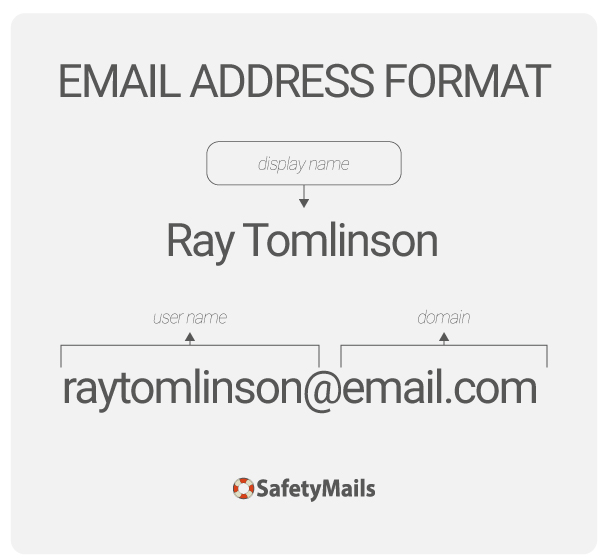
Email syntax is the basic standardization of the elements that make up an address, i.e. the user name followed by the @ symbol and the domain name with an extension (.com; .com.br; .org etc.).

Table of contents
How emails with syntax errors harm email marketing senders
Emails with syntax errors become invalid addresses, as flaws in the formatting of the address make the email non-existent. It is therefore impossible to communicate with a recipient who does not exist.
These errors in the formatting of the email address most often come from typos, which frequently occur when someone fills out a registration form on a smartphone, for example.
Who hasn’t typed “Gamil” instead of “Gmail”? Or entered a username that doesn’t exist because two letters were swapped?
How to solve the problem of invalid email formats in forms
Real-time email verification prevents emails with syntax errors from entering registration forms.
The verification API, which integrates with various data collection services (websites, landing pages, forms, etc.), identifies addresses with errors and does not accept them in forms.
By recognizing emails with typos in more common domains, the API can suggest corrections, displaying a “Did you mean” suggestion.
And if the error occurs in the username (which indicates a non-existent and therefore invalid email), the API prompts the user to enter a valid email so they can download, access the material provided by the form, or complete their registration.
Now that you’ve seen how important email verification is for building a healthy contact list, let’s learn how to recognize the structure of an email address.
Email formats: user name
Located before the “@” symbol and identifies the person or function of the email address in the domain.
May contain
- Letters from A to Z
- Numbers 0 to 9
- Special characters: underscore, period and hyphen. Any of these characters must be followed by a letter or number.
What is not allowed in the user name
- Period before or after the name (e.g.: .paul@domain.com)
- More than one consecutive period (e.g.: paul..@domain.com)
- Special characters other than underscore, period and hyphen (e.g. paul#@domain.com).
Email formats: the @ symbol
It’s the sign that separates the user’s name from the domain name.
The first emails with this configuration appeared in 1971, when engineer Ray Tomlinson created the first email system that allowed messages to be sent between different computers on a network.
Tomlinson inserted the @ to separate the user name from the domain. In this way, recipients could know where the messages were coming from.
Email formats still follow this structure today.
The domain name
May contain
Letters from A to Z
Numbers 0 to 9
Special characters: only the hyphen, but it cannot be used at the beginning or end of the domain name
Domain extension
The domain extension comes last in a website’s address. Correct extensions give an indication of the site’s purpose or geographical location.
For example, a website with a .com.br extension is from Brazil. A site with a .com.pt extension is from Portugal and so on.
In addition, the final part of the domain also has the function of identifying the purpose of the site. For example, a .gov.br extension indicates that the Government of Brazil owns the site.
The same goes for a .org.br extension, which indicates that the owner is a Brazilian association, foundation or NGO.
There are numerous domain extensions, such as: .com | .online | .net. Below is how they are classified technically.
In email formats, extensions are segmented in the following order
Sponsored top-level domains
Domains sponsored by a specific entity that establishes rules and restrictions for their use. For example:
- .gov – Government
- .edu – Educational institutions
Generic top-level domains
These are the most common domains and are not restricted to a specific geographical location:
- .com – Commercial
- .org – Organizations (usually non-profit)
- .net – Networks
- .info – Information
- .tech – Technology
- .shop – Commerce
- .blog – Blogs
- .app – Applications
- .design – Design
Top-level domains with country code
These domains are assigned to specific countries and usually have two letters:
- .us – United States
- .uk – United Kingdom
- .de – Germany
- .jp – Japan
- .br – Brazil
Second level domains
In addition to the top level, some countries use a second level to further specify the purpose of the site. For example:
- .org.uk – Organizations in the UK
- .edu.au – Educational institutions in Australia
- .com.br – Commercial in Brazil
In email formats, each type of domain extension serves different needs and contexts, offering many options for individuals and organizations when choosing their web addresses.
Corporate email formats
Exclusive domain
First of all, we need to understand that a professional email must have good email hosting with its own domain, i.e. the company name registered on its website.
This provides the credibility a company needs. For example: yourcompany@yourcompany.com is an exclusive domain, unlike yourcompany@gmail.com, which is a public domain.
In addition, professional emails have their own signature, which is important for the reputation of email senders. For example, when sending an abandoned cart recovery email, the message is immediately recognized by the customer.
And speaking of reputation, your own domain offers the possibility of working with email marketing, since email automation platforms accept corporate addresses as senders.
Many recipient providers prefer professional addresses for bulk email senders.
Username and information security
The choice of username for corporate emails can have an impact on information security.
Common usernames, such as admin@ or financeiro@, can be targeted in phishing attacks, where a scammer performs a dictionary attack to send fake emails, increasing the likelihood that a recipient will click malicious links or disclose confidential information. A recommended approach is to use the username plus job title, not just the job title.
Bonus tip: how to discover corporate email formats to build a list
Corporate mailing lists mean you can scale your business. And getting those emails is what every email marketing professional wants.
SafetyMails offers a free search service for corporate email formats to help sales and marketing teams build their lists.
This service offers some possible email structures for a company.
For example:
- First name + ‘.’ + Last name | e.g.: caio.inbox@company.com
- First name + ‘.’ + middle initial + ‘.’ + Last name | e.g.: caio.e.inbox@company.com
- First name | e.g.: caio@company.com
Conclusion: the importance of correct syntax
The correct syntax of emails in registration forms is essential to ensure the effective delivery of messages, protect against security threats and maintain a high level of professionalism in communication.
An incorrect address can result in messages not being delivered or being sent to the wrong recipient. This damages the sender’s reputation, especially in professional environments.
In addition, poorly formatted email addresses can expose flaws and vulnerabilities in authentication and validation systems. Hackers exploit these weaknesses to carry out phishing attacks, identity theft and other malicious activities.
Implementing real-time email verification can prevent many of these problems, helping to ensure a positive experience for both users and organizations.
FAQ
What does email syntax mean?
Email syntax is the basic formatting present in all email addresses: user name + @ + domain name + extension. Formats that do not follow this standard are invalid and can harm email marketing lists.
Mail providers may block lists that contain many invalid addresses, damaging the senders’ reputation.
How does the verification API prevent emails with syntax errors from entering the forms?
The API, integrated with various email collection services, identifies emails with typos in the user name and prompts the user to enter a valid address so they can continue with their activities and access the material provided by the form.
If the error is in the domain name, the API may suggest a correction by displaying a “did you mean” prompt, helping the address to be entered correctly. This increases the likelihood that lists collected from registration forms will reach recipients’ inboxes and represent real business opportunities for sales and marketing teams.