Bulk email verification
Verify your email list in bulk, identify invalid and risky addresses, and review the results before your next email marketing campaign.
2B+
Emails verified
8K+
Customers
12
Countries
20+
Years of team experience
Bulk email verification before you send
Invalid addresses take up space in your email list, consume resources, and generate bounces. Identifying them before you send helps reduce hard bounces and avoids spending on messages that will not reach the recipient.
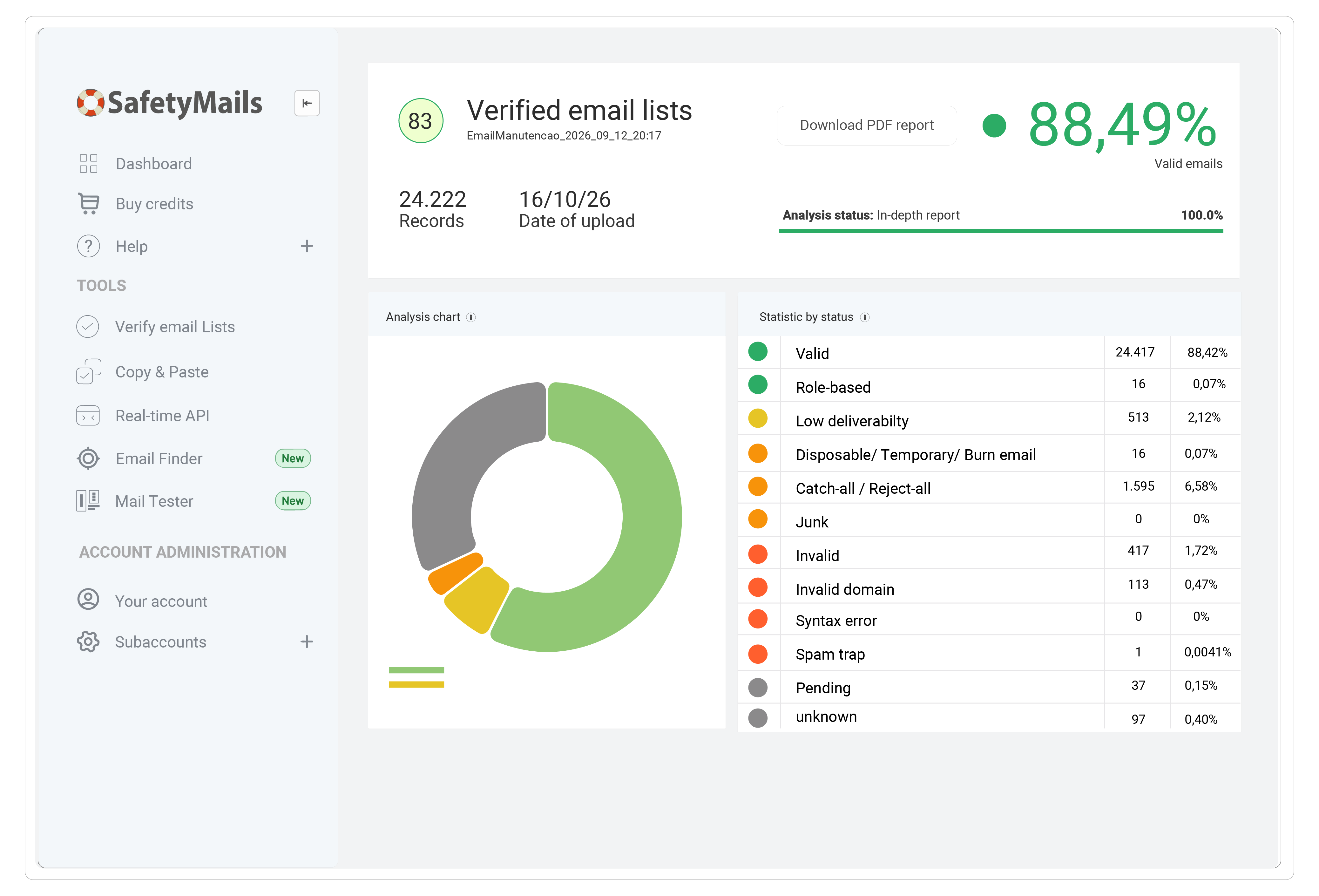
With SafetyMails, you can verify an email list from a file. This bulk email checker classifies addresses and presents the results in a report, allowing you to separate invalid contacts and assess those that need attention before using them in email marketing.
More than 8,000 customers trust SafetyMails. Create your account and try email list validation with 100 free credits.
Create your account and try itBULK EMAIL VERIFICATION
How to verify email lists with SafetyMails

More reliable email lists for your email marketing
An email list can bring together contacts from different periods, forms, and marketing activities. Over time, some of those addresses stop working or become a risk. Email list cleaning helps identify these issues before an import, platform migration, or the resumption of sending. The bulk email validator helps you assess the list before those steps. Use the analysis to:
- Separate invalid addresses that may generate hard bounces.
- Identify disposable emails and other risky contacts.
- Avoid spending on sends to invalid addresses.
ADDRESS ANALYSIS AND REPORTS
Features of the bulk email verifier
Invalid address identification
Identifies invalid addresses so you can remove them from your email list before sending.
Catch-all domains
Identifies domains with generic responses that do not allow the existence of each mailbox to be confirmed.
MX record analysis
Checks the domain records that indicate the servers responsible for receiving email.
Syntax verification
Analyzes the structure of addresses and identifies formats that are incompatible with email-format rules.
Disposable emails
Identifies addresses from disposable-email services to support the selection of contacts in your email list.
Copy and paste
Paste addresses into the dashboard to analyze a group of contacts without preparing an upload file.
Risk analysis
Flags potentially harmful addresses to help guide contact selection before your next sends.
Role-based email addresses
Recognizes addresses associated with roles or departments, such as sales@, so you can evaluate them separately from other contacts.
Verification reports
Review the classifications and distribution of results to guide how you handle your email list.
Domain correction
Identifies common typing errors in the domain to help recover contacts that could otherwise be lost.
Domain classification
Differentiates free providers and corporate domains to broaden your view of your email list's composition.
FAQ
Need help analyzing your email list? See our documentation or talk to the team via chat.
The upload lets you analyze email lists with up to 2 million addresses per file. For larger volumes, talk to our team about other processing options, such as secure FTP.
Prepare a CSV file with the addresses organized in one column. This format can be generated by spreadsheets and many email marketing platforms. Before uploading, see the documentation for file-preparation and import guidance.
Yes. SafetyMails offers integrations with different platforms. Import, export, and verification options depend on the integration you use. See the available integrations to choose the workflow that fits your operation.
Review the report classifications and separate invalid addresses before sending. Assess contacts flagged as disposable, risky, or inconclusive according to their source and relationship history. An inconclusive result does not confirm that an address is valid or invalid; it therefore requires a different decision from one applied to an address that has been proven invalid.
Verification also does not establish a recipient's consent or measure their interest in your messages. Use the results together with permission and engagement information to decide which contacts to use in email marketing.
Yes. When you create your account, you receive 100 free credits to try the service. Use this balance to analyze a sample of your email list and get to know the classifications and reports shown in the dashboard.
Data related to verified emails is stored for 60 days. Account data is deleted upon a cancellation request. See our Data Protection Policy for the applicable terms.
Each verified address uses one credit. For an email list with 10,000 addresses, for example, you need 10,000 credits. Purchased credits can be used according to your verification needs.
Consider the number of addresses you plan to verify and the credits available in your account. If you need to verify email lists regularly, include that demand in your purchase planning. See the pricing page to compare the available packages.
For an individual check, use our tool to verify one email for free. If you need to analyze multiple addresses, create an account and use the SafetyMails bulk email verifier to process your email list.